If 1:1 laptops have not yet reached your classroom, there is most likely other tools which can be utilized for learning. Many students in the intermediate secondary levels already have their own cell phone and are often able to use them at school for educational purposes thanks to many school boards' BYOD policies. Are you utilizing this tool to improve learning?
5 Tips to get a mobile program up and running:
Clearly define when, how and why mobile devices are being implemented
Consider the digital divide - will some students be left out not owning a device?
Co-create a clearly defined set of rules with students which compliments the school's established Responsible/Acceptable Use Policy.
Practice using devices in group settings first to ensure students are familiar with the technology and can effectively use it.
Ongoing reflection of your teaching practice: Is the use of technology modifying or transforming the learning task?
There are many softwares which support the use of mobiles in the classroom. The following are not limited to use with mobiles, but can easily be integrated into a BYOD setting:
I used to teach Grade 8 English for 90 students. That meant whenever there were class presentations....I watched 90 of them. Thus, one would understand why I absolutely refused to let my students create boring, unengaging presentations using static, simple technology.
I didn’t restrict what software my students could use, rather I restricted what they couldn’t use by banning PowerPoint.
However, I learned as a teacher to be sure to direct students to programs that fit the criteria of the assignment. Since my oral presentation had to include a live speaking portion, students who chose the PowToons option were left starting and stopping their video. You can imagine how NOT smooth my nervous 13 year old students were in doing this in front of an audience of their peers.
When providing options for students to create a presentation, it makes sense to me to seperate technology by presentation slides and presentation videos.
See my review of various technology to create slides (could also be used as a student resource):
There has been a lot of talk lately around the theory of ‘flipping the classroom’. Essentially, students preview lesson material and lectures at home to make time to do more hands-on, collaborative activities in class.
Watch the following short video or view this infographic for more details.
However, what teacher has the time to create a high quality video for each lesson?
Allow me to be so bold as to say: no teacher. Though I have seen success from teachers who simply record themselves teaching a lesson at the front of the class or from an aerial view then posting it in a place students can access such as on YouTube or school LMS. This simple act allows the student to pause or rewind any confusing parts of a lesson which promotes self-regulation in the learner. Further, I have also seen success from teachers who record their screens during a lesson using tools such as EduCreations or the recording feature on SmartBoards. What’s great about this format is the accompanying online learning community of educators who have posted their own lessons to share. You could further check out places such as OpenEd or Share My Lesson for lesson sharing in a video format. Flipping the classroom has many benefits: instead of students listening to a transmissive, passive lecture, teachers can utilize the collaborative environment of the classroom by guiding cooperative and exploratory tasks. It also frees up the teacher’s time to provide personalized instant feedback to students and differentiate instruction by pulling small groups of learners to work with. However, there are many problems to the flipped classroom as well. What if the students don’t do their homework? What if there were technology issues? What if every subject teacher expected a student to learn lesson content the night before (how many hours of homework is that??) The more prominent downfall I spotted in my sideline analysis of the flipped classroom is that student grew tired of the format. Making an educational video entertaining is a hard feat! Creating even a simple animation or instructional video to accompany or substitute a face-to-face lesson takes much effort and time on the teacher's part. What I realized is that I did not have to create the video myself - what it came down to is finding the best resource to fit my teaching needs. Why re-invent the wheel? Luckily there are many free educational video resources available online.
I’ve also learned when it comes to the flipped classroom, as with anything, it works best in moderation. I appreciate many educational benefits to ‘flipping the classroom’. But I also am going to teach a lesson in the format which I feel worked best for the topic and my learning goals. For instance, I chose to flip a lesson during a speeches unit I taught. In this lesson, I had students view Martin Luther King Jr.’s infamous “I Have a Dream” speech at home, identifying literary devices and observing the vocal skills used in the speech. By flipping the lesson, students could view the video as many times as they liked. For the in-class lesson, we discussed the answers in groups and as a class before viewing another video which deconstructs the speech. I used the extraordinarily user-friendly site Ted Ed Lessons to create this lesson, along with embedded instructions, formative assessment , and discussion forum.
The website sends the lesson creator a link to view what students have started the lesson and to review progress. Other teachers can also customize the lesson to suit their needs.
Collaborate and share with others - work on a document in live time; collaborate on whole folders of documents; share with others via a link or email with various levels of editing rights
Auto-save feature - no more backup files as documents save every few seconds
Sync all your documents in a clouded drive - access your work from any device by signing into an account
How They Differ:
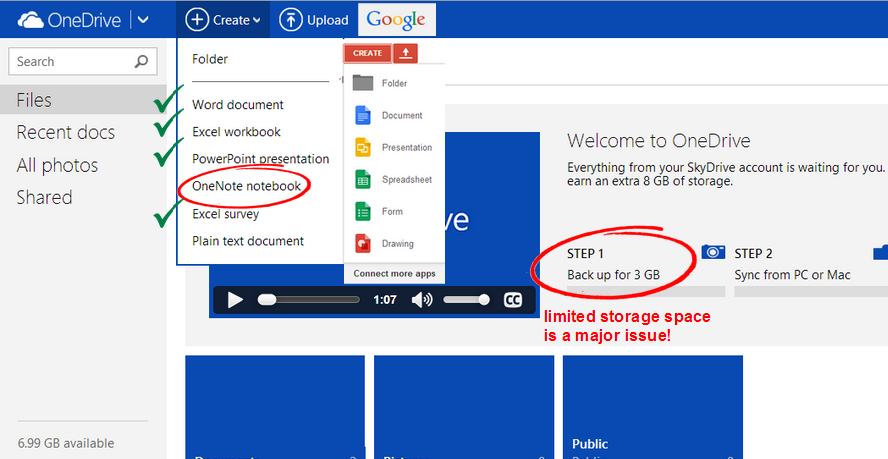
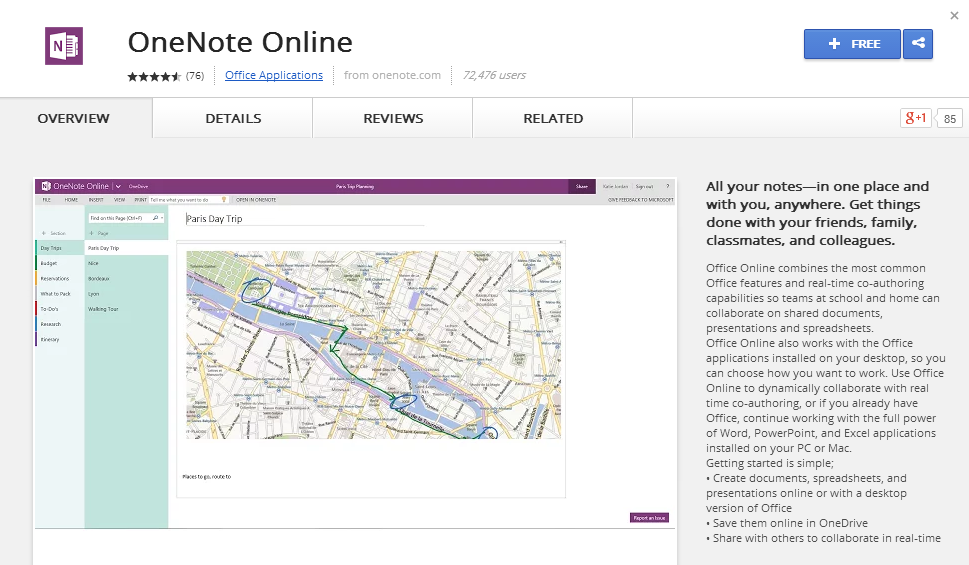
At first glance, One Drive and the comparable Google Drive offer many of the same types of documents to create. OneDrive does not offer a Drawing option, but this is not that great of a feature in my opinion as there are many better drawing tools available online. A major benefit of One Drive over Google Drive is an online version of OneNote.
What’s a greater concern is the mere 3 GB of storage space on One Drive with the ability to upgrade by recommending the service. This is extremely limited when considering that Google offers 15GB of free storage (30GB if you are signed up at work or school).
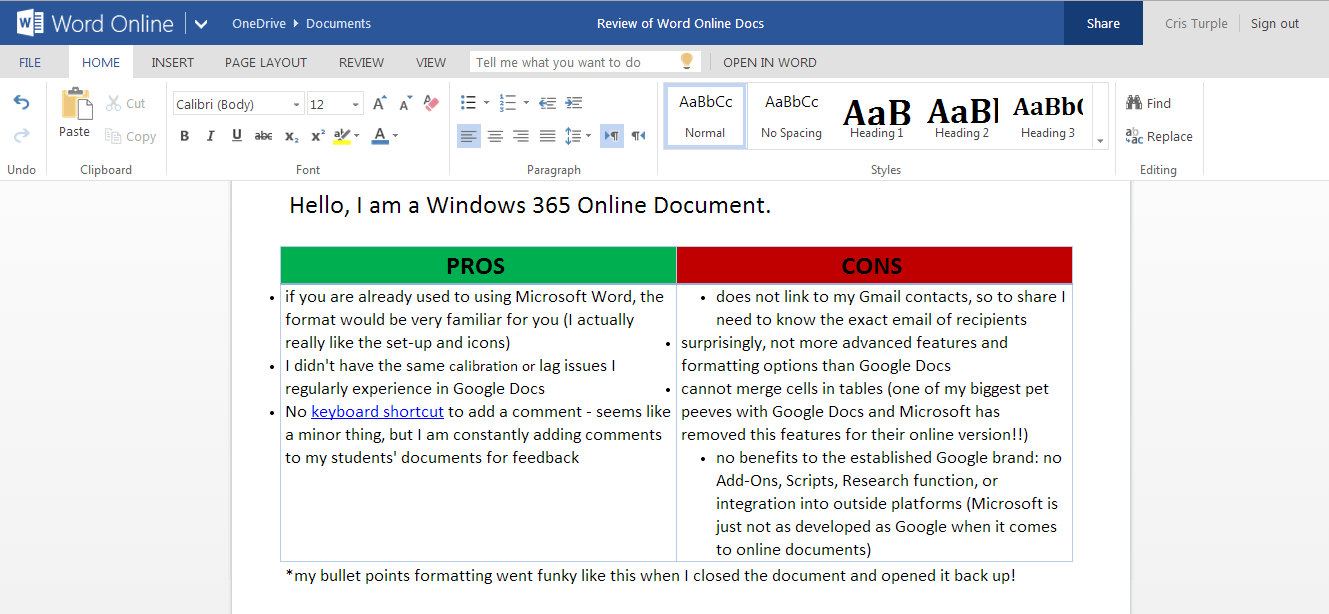
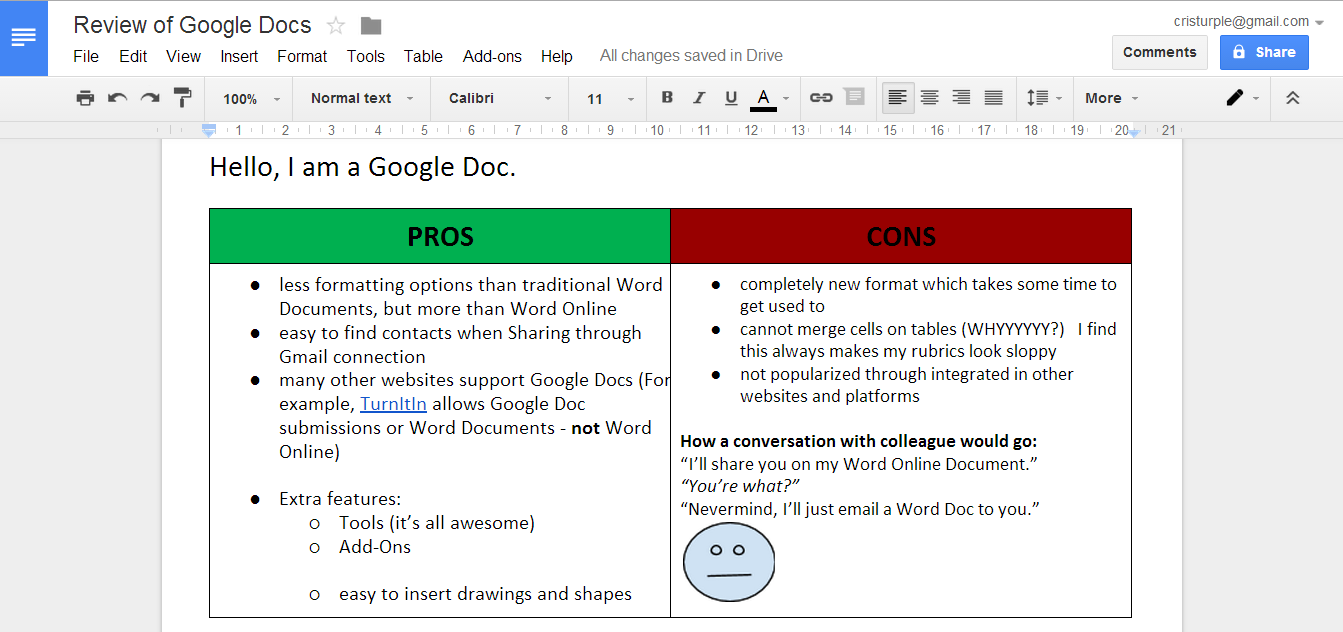
Personally, the only time I ran into formatting issues in my daily use of Docs was when I printed pages, but I do admit it can be a problem. Ironically, it was the Word Online document’s formatting that was disarranged during my demo.
The Bottom Line:
If you work in an environment that is already utilizing Microsoft products or produced highly formatted documents, Word Online is an ideal tool to increase collaboration and sync work. However, if you regularly use Google tools (like I do in a Google certified school) than it makes more sense to stick with Google tools.
This hybrid method of learning combines traditional classroom and online education. Blended learning has emerged with the advancement of new technologies in an effort to reach and teach students more effectively. While educators may debate the exact meaning of the term, the gist is that online technology is used not just to supplement, but transform and improve the learning process.
The website further states, “Blended learning uses the tools of the provincial learning management system (LMS) to teach and support learning in a face-to-face class.” Thus, technology used to support Blended Learning not just technology tools which can be used in the classroom, but online learning platforms meant to support traditional classroom learning. The goal is to use technology to build an online learning community that transcends the walls of the classroom so students can continue their learning outside the classroom.
Social media is a great tool to integrate into the classroom and I have experienced with various platforms such as Edmodo, Blogger, Google Sites, Facebook, Skype and most prevalently Twitter. I used Twitter in my practicum classroom back in Ontario and it went over quite well. The students stayed in touch with me and their peers from the ease of their phones and home computers. I was able to send links to the students easily and recommend educational resources related to the topics were were learning about in class. Last year, I piloted a Twitter program at my school and Hong Kong and did not have as successful of results. Twitter is not popular in Asia and many of the students had never even heard of it before. After the chaos of getting 90 students signed up on the website, I found Twitter not to be very user-friendly for 12 year olds. Unfortunately the students were not very engaged in using Twitter as it was not a form of social media they were interested in using. In addition, we ran into many problems with the students’ inboxes getting spammed with adult content.
In the end, we found other collaborative web 2.0 tools such as Edmodo and Google Docs a better fit for our students. I personally use Twitter to connect with other educators and find it a valuable tools for collecting resources and having conversations with other educators.
The Horizon Report is a decade-long comprehensive research project designed to identify and describe emerging technologies likely to have an impact on learning, teaching, and creative inquiry. This report is the result of a joint venture between The New Media Consortium (a globally focused not-for-profit consortium dedicated to the exploration and use of new media and new technologies) and The ELI (a community of higher education institutions and organizations committed to advancing learning through information technology innovation).
The following are my synthesized points of learning from the 2011, 2012 and 2013 editions of the report, outlining the contemporary key trends and critical challenges of emerging technologies.
Key Trends
1. The abundance of resources and relationships made easily accessible via the Internet is increasingly challenging us to revisit our roles as educators.
sense-making and the ability to assess the credibility of information are paramount - teach research skills, not knowledge
media/digital literacy for students to be able to navigate the internet
2. Technologies we use are increasingly based not on school servers, but in the cloud.
browser-based software that is device-independent
notions of privacy and control (where is the line?)
significant cost savings (bring your own device)
3. Technology continues to profoundly affect the way we work, collaborate, communicate, and succeed.
The digital divide, once seen as a factor of wealth, is now seen as a factor of education
evolving occupations, multiple careers, and an increasingly mobile workforce (prepare students for jobs which don’t exist yet)
4. People expect to be able to work, learn, and study whenever and wherever they want to.
logistical challenges in a busy, fast-paced world (should we also be sure to unplug?)
the implications for informal learning are profound - social networks
“just-in-time” learning and “found” learning: maximizing the impact of learning by ensuring it is timely and efficient
5. The perceived value of innovation and creativity is increasing.
“Innovation is valued at the highest levels of business and must be embraced in schools if students are to succeed beyond their formal education. The ways we design learning experiences must reflect the growing importance of innovation and creativity as professional skills.”
Mid-term horizon (within 2-3 years): augmented reality and game-based learning
Far-term horizon (4-5 years):gesture-based computing and learning analytics
Critical Challenges
1. Digital media literacy continues its rise in importance as a key skill in every discipline and profession.
despite widespread agreement on its importance, training in digital literacy skills and techniques is rare
the lack of formal training is being offset through professional development or informal learning, but we are far from seeing digital media literacy as a norm
digital literacy is less about tools and more about thinking, thus skills and standards based on tools and platforms have proven to be somewhat ephemeral (short-lived)
2. Economic pressures and new models of education are presenting unprecedented competition to traditional models of schools.
ways to control costs with growing number of students, and fewer resources and staff than before
simply capitalizing on new technology is not enough; new models must engage students
3. The demand for personalized learning is not adequately supported by current technology or practices.
more learner choice and control (differentiated instruction)
“It has become clear that one-size-fits-all teaching methods are neither effective nor acceptable for today’s diverse students” - has one-size-fits-all teaching ever been an effective way to teach??
4. The fundamental structure of the K-12 education establishment — aka “the system.”
“As long as maintaining the basic elements of the existing system remains the focus of efforts to support education, there will be resistance to any profound change in practice.”
Why are we still educating in the same manner we did before computers were invented? Why is education not the number one priority to our society? Capitalist mentality: no personal gain from education system
5. Many activities related to learning and education take place outside the walls of the classroom and thus are not part of our learning metrics.
social networks: difficult to tie back to the classroom, as they tend to happen serendipitously and in response to an immediate need for knowledge, rather than being related to topics currently being studied in school
I made the switch. After a year of flip flopping between various formats and learning platforms in an attempt to distribute materials in the most effective way to my students, I transitioned to Google Drive. I started using Google Docs about 3 years ago. In my past teaching, I have created lessons on Docs when working with other teachers and had students use them when collaborating on group projects. However, the lack of technology in my past school did not allow the foundation of my teaching to be in the Google cloud. Now that I teach at a one-to-one laptop equipped school, I feel very fortunate that this is even an option for me. Perhaps it was the Google Apps for Education Summit I attended last June that pushed me over the edge. Learning about many new Google Apps, made me think that Drive could be an equivocal solution to compiling all my lessons and resources in one place.
Recently, I ran a professional development workshop aimed at familiarizing teachers with the key features of Google Drive. See my presentation with links to further resources to get you started if you are new to Google tools.
When envisioning what a 21st century classroom would look like, I seem to get less caught up in the physicality of a room lined with the newest technologies or the aesthetic qualities of the room. Instead, my mind wonders more towards the academic content which fills a classroom. I imagine beyond the physical constraints of a traditional classroom to an environment injected with 21st century teaching and learning.
The 2011 Horizon Report suggests that the demand for personalized learning is not adequately supported by current technology or practices. The report states, “It has become clear that one-size-fits-all teaching methods are neither effective nor acceptable for today’s diverse students.” But is this idea genuinely clear when condidering the structure of today’s education system?
A truly progressive classroom requires a complete restructuring of what has been conceived as a learning environment for the past 100 years:
Through the process of creating this glog, I gained a deeper understanding of just how new technologies can be utilized to convey meaning and knowledge in a manner which best suits an individual. A glog is just one example of a way to reach those who are classified as ‘visual learners’. I have discovered through my own experiences as a student that tailoring instruction towards a visual learning style requires more than simply adding images to a slideshow (or SMARTboard!) and proceeding to lecture at students. Instead, I feel students should be engaged in the exploration of a topic. A tool such as Glogster offers a platform for learners to display their understanding using a medium which may be best suited for his or her learning preferences. Glogster gave me the opportunity to construct my knowledge in a way which works for me, and allows me to express a collection of ideas in a visually appealing manner.
I will be presenting a short session on LiveBinders at the fourth annual Brock University Education Technology Showcase. This PD event showcases innovative educational technologies, and more importantly, how such technologies can be integrated in the classroom.
LiveBinders is a Web 2.0 tool which can be used to organize websites, blogs, photos, videos, word documents, Google Docs, Voice threads, PDFs, and so on. Visualize it like a bookshelf in your room. On each shelf are binders containing information on various topics. Each binder is organized by an overall subject. Each subject is further divided into sections, and smaller subsections using tabs.
LiveBinders allows you to bundle online resources without printing hard copies of the information. But more importantly, links are automatically updated as they would appear on the web, and other mediums such as Livescribe Pen files, Google Docs and webpages can be added as well. By making LiveBinders public, you can make your binders open for others to view. Or you can decide to just search other Livebinders while keeping yours private. It’s like borrowing someone’s book and making a copy for yourself. But no physical storage space is needed, it’s accessible from any device with an internet connection, and we’re reducing our eco footprint by not printing off a stack of papers. The following is a video tutorial I have created for new users of LiveBinders: For me it’s about the organization of information. With the limitless amount of information available at our finger tips, I needed to find a way to organize and compile data in a useful and meaningful way.Learning about these individual tech tools is great, but not if it’s information overload.
Through the use of LiveBinders, I can go into any classroom with an internet connection and have with me every teaching resource I’ve ever compiled, as well as other teachers’ unit plans I’ve found to be helpful. I have learned that teaching is not about reinventing the wheel. It’s about taking snippets from multiple places and molding it into something that suits the needs, abilities and interests of the students. Almost every teacher I’ve worked with has had an intense physical filing system full of lesson ideas and plans, as well as multiple shelves of books. LiveBinders is a digital and collaborative version of such traditional filing systems. This is the filing system of the 21st century teacher.
Traditionally, the term literacy has been used to describe the ability to read and write. However, as our world changes and develops, the forms and functions of literacy have evolved with it. In today’s world, social forces such as the rapid emergence of the internet, economic competition, migration and immigration, and the state of the planet all contribute to a reconceptualized idea of what literacy is. Reading itself is not comprehension, and children need to have sustenance beyond reading as it is not enough if they do not know what to do with the words. Students need to be able to go beyond reading and writing to understand the world, be equipped with the skills to survive in today’s changing society and become global citizens.
One of the major ways our society has changed is the abundant amount of information now available through the invention of new technologies. To get through this new text-saturated culture, we need to teach children critical literacy. Critical thinkers and media literate persons actively analyze to uncover underlying messages and biases presented in all forms of texts, media, images, and so on. This notion of an ‘acquired skepticism’ encourages students to establish a disposition towards a text, and not merely take it at face value. We have created a difficult world for children to live in, so we must prepare them to navigate through the excess information available to them, and critically analyze everything they are exposed to.